Blockbench - Source Code
Plugin: Creative Mode
Fixes
-
Fix the top-right toolbar disappearing when selecting some tools.
-
Fix the Outliner jumping erratically.
-
I don't know what causes it.
-
-
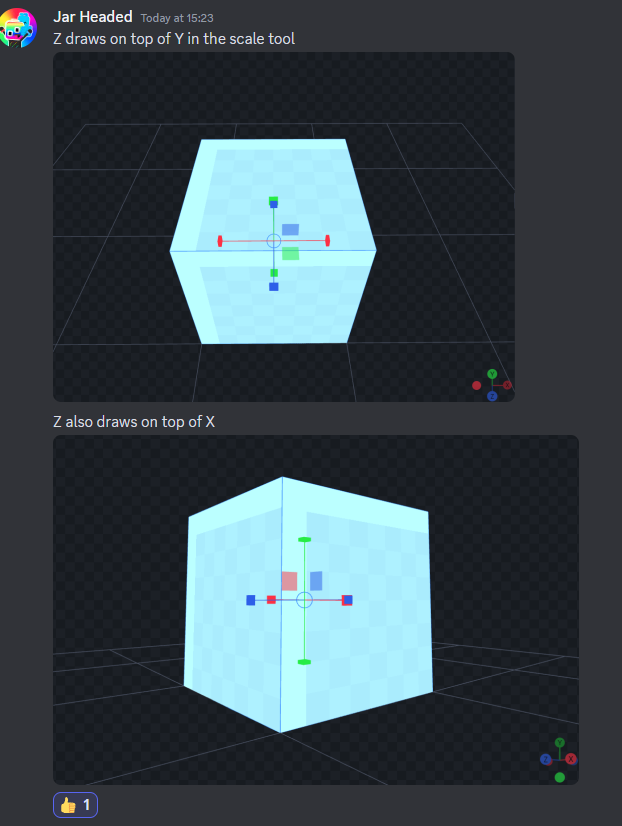
Scale issues:
-
If the cube has 'rotation' and 'scale', it doesn’t tile well.
-
Apparently, this problem happens when the block only has 'scale' changed, without rotation changes.
-
-
Can't use ctrl S during navigation.
-
Performance issues.
Ideas
-
Grid System.
-
Uses multiples of 16.
-
Can be used to position a Cube in a place different from just the corner of the Target Cube.
-
Grid parallel to the clicked face of the Target Cube.
-
-
If placed in an empty area, then the grid will always be at Y = 0 (or Y = 8), making it look like blocks are positioned on the world’s natural Grid.
-
Allow placement on Meshes.
-
-
New 'Creative' tab:
-
The act of "activating the tool" switches to a new "Creative" tab, like Edit, Paint, and Animate.
-
In this new tab, only the groups are shown, similar to Animate.
-
-
Interface to display which block is currently selected.
-
-
Minecraft Workflow:
-
Test compatibility between Creative Mode and WASD Controls.
-
Ensure the selection always stays with the Sample Cube.
-
Hide gizmos.
-
Deactivation
-
Classic toggle button for the tool.
-
Pressing Esc deactivates the tool.
-
There will probably be other conditions for deactivation. Could be tricky.
-
-
-
Crosshair.
-
Cube placement now always happens relative to the screen center.
-
-
Navigation:
-
Move the camera with the mouse without pressing the Right Button.
-
Capture the Mouse.
-
-
Instantiate and Remove:
-
Right-click places blocks.
-
Left-click removes blocks.
-
-
Limitations I will not fix
-
It’s only possible to place 1 object at a time. If multiple objects are selected, only one will be used as the CubeSample.
Clarifications
-
Moving the Origin only moves the Pivot Point.
-
Moving the From and To only changes the Position.
-
Moving the Pivot Point in the Gizmo makes the block adjust its Position automatically, keeping the current location. However, moving the Pivot Point in the numeric values makes the block move, not maintaining the same position.
-
Regardless of which option is used, the logic is the same. There’s no logical inconsistency at any point, only different behaviors depending on how the Pivot Point is altered.
-
Plugin: WASD Control
Implementations
-
Move only with the right button.
-
Run and walk buttons.
-
Save configurations through load.
-
New: Mouse capture.
-
Option to change camera sensitivity.
-
% Maybe the SOURCE should handle Capture, not the plugin.
-
Fixes
-
Fix the Outliner jumping erratically.
-
I don't know what causes it.
-
-
Fix 'ghost input' (usually on S).
-
Maybe I’ll emit inputs on startup to ensure everything is ‘up’.
-
-
Fix Zoom (this indirectly fixes Pan).
Future implementations
Toolbar
-
Proportional editing range appearing where it shouldn’t.
-
'spacer' not working properly.
-
Plugin Mesh Tools: Cubic Projection always appearing by default.
-
Create a toolbar export file
-
https://github.com/JannisX11/blockbench/issues/223
-
-
Toolbar resetting.
-
My PR .
-
https://github.com/JannisX11/blockbench/issues/1851
-
Export
-
% 'auto export' button, to export using the last export settings.
-
Make the export path always the same as the .bbmodel file.
-
My PR .
-
Or create a button for that.
-
Draw
UV and Texture
-
Tool for 'smart uv project'.
-
fix the name.
-
UV Mapping icon from MTools.
-
option to 'reset' all faces.
-
option to unwrap each face independently.
-
make 'combine islands' disabled by default.
-
-
% Scale tool via Pixel Density.
-
Confusing things:
-
“UV Size in texture properties”??
-
“UV Size in project settings”??
-
Indicator (64x64) at the top of the UV Editor??
-
Is it related to “UV Size in project settings” or “UV Size in texture properties”?
-
-
what the heck is “apply to template”?
-
-
Fixes:
-
bool color in Create Texture -> Color section.
-
-
Optimize unwraps.
-
My issue .
-
make it very small.
-
Cubic Projection does this quickly.
-
-
apply Auto UV Size
-
js/texturing/uv.js: 1588
-
-
do the correct scale using
uv_size_pixel_density_multiplieranduv_offset_pixel_density_multiplier
-
-
-
fix the startup.
-
fix the name.
-
*Tests:
-
Confirmed this makes the object export with the repeating texture as well.
-
-
allow painting on repeated regions in Paint Mode.
-
-
Tool to remove UV snap to image bounds.
-
fix the name.
-
-
Remove zoom-out limit.
-
UV Overlay rework for selected objects only.
-
Rework the tool’s Edit Mode version.
-
Enum containing 4 options: 'none', 'selected faces', 'all faces', 'all elements'.-
Had issues with vue.js, not sure why.
-
-
Annoyances
Outliner
-
Can't select and move multiple groups.
Source
Source: Assets
-
Icons .
Source: Files
js/texturing/texture.js
-
1135: repeat option in image properties.
-
1790: Texture.prototype.menu
-
Context menu for a texture.
-
-
2331: BARS.defineActions
-
Texture panel actions.
-
-
2374: Create texture
-
2382: Append to template
-
2425: Interface.definePanels
-
Texture panel.
-
js/texturing/texture_generator.js
-
73: appendToTemplateDialog
-
148: Create texture -> generateBoxTemplate and generateFaceTemplate
-
650: generateFaceTemplate
js/texturing/uv.js
-
527: SlidePos
-
1960: new toggle
-
let do_move_uv = !!(BarItems.move_texture_with_uv.value && this.texture);
-
-
2066: bar with toggle
-
2730: Drag
-
3218: DragVertices